
ClusterPilot helps companies create, scale, update and repair Kubernetes clusters through controlled workflows. Repeated work is automated, errors become visible earlier and every step remains traceable. This reduces manual effort and operating and support costs without giving up control of the infrastructure.
Why everyday Kubernetes work becomes expensive
Creating a cluster is rarely one simple step. Teams check infrastructure, prepare servers, run scripts, verify results and document what happened. Scaling, updates and repairs create similar work.
When these tasks are spread across tickets, tools and terminal sessions, people repeat the same work. Errors are often noticed late. Important knowledge stays with a few specialists, and support teams first have to reconstruct what happened.
Too many manual steps
Recurring tasks are repeated by hand and take time away from platform improvements.
Errors appear too late
Missing prerequisites may only become visible after an operation has already started.
Knowledge depends on individuals
A small number of Kubernetes specialists become a bottleneck for routine work.
Evidence is scattered
Tickets, logs and screenshots have to be collected manually for support and handover.
What a good Kubernetes self-service portal should do
A Kubernetes self-service portal gives authorized users a simple way to start approved cluster tasks. They do not need to know every command or ask a platform engineer to perform every step.
Platform teams define permissions, available choices and requirements. ClusterPilot then runs the approved workflow and shows its progress in one place.
Which Kubernetes tasks does ClusterPilot support?
ClusterPilot brings central cluster management and recurring Kubernetes operations together in one clear workflow.
Create clusters
Plan infrastructure, check prerequisites and provide a Kubernetes cluster through a repeatable workflow.
Scale clusters
Add or remove nodes through a controlled process with visible progress.
Update Kubernetes
Check versions and prerequisites before the update and document the result.
Repair failures
See useful error context and replace defective nodes through a defined workflow.
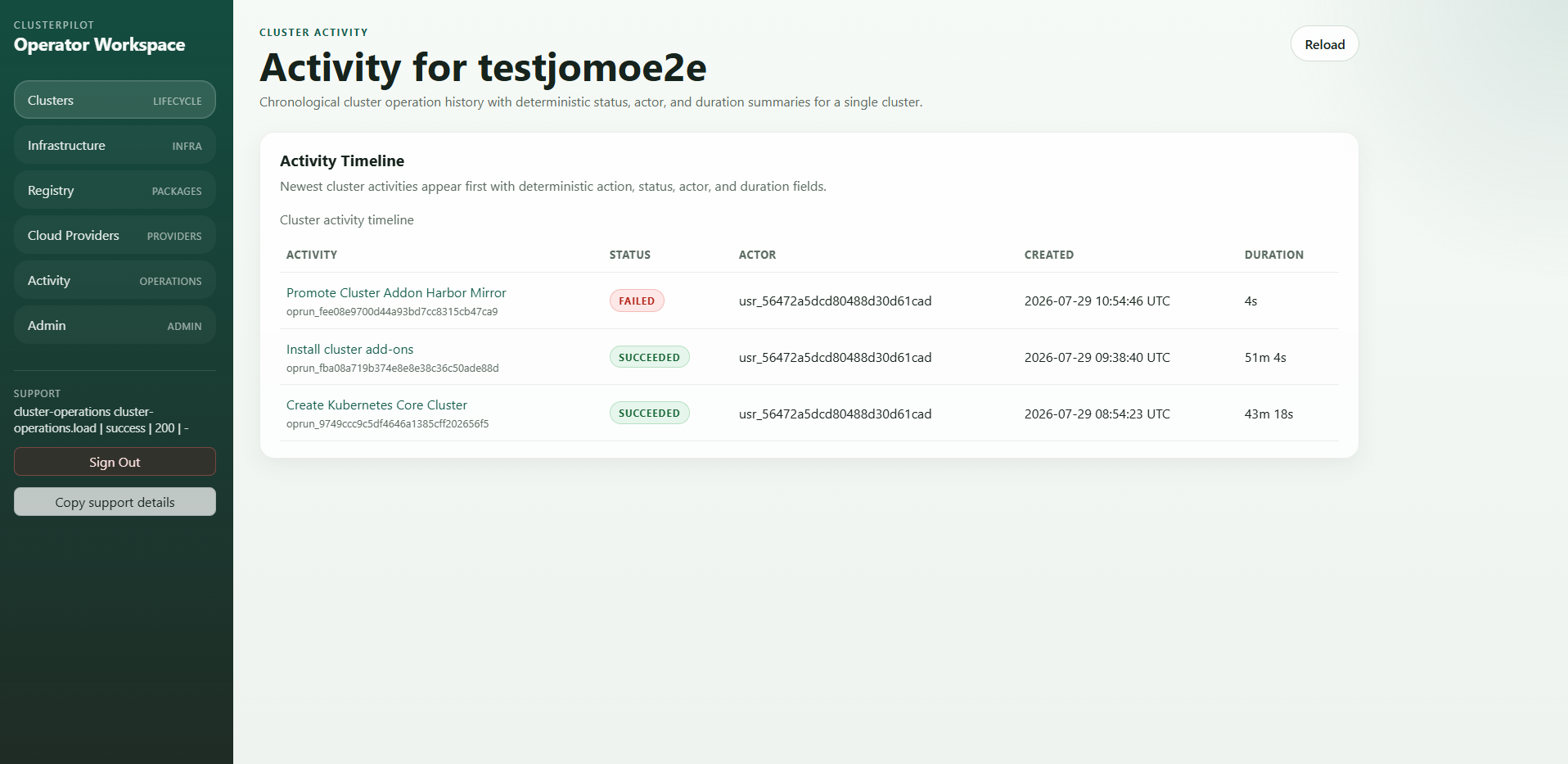
How ClusterPilot works in three simple steps
The same clear flow applies whether a team creates a cluster or performs a later operation. Users see what is planned, what is running and how the operation ended.
- 01
Plan infrastructure and cluster
Select the approved target and let ClusterPilot check the required prerequisites.
- 02
Run the Kubernetes workflow
Start the approved operation while ClusterPilot executes and records the individual steps.
- 03
Understand progress and results
Follow the status, see errors earlier and retain the result for support and handover.
Trusted Kubernetes tools. Installed from one place.
ClusterPilot brings essential platform tools into your cluster through clear workflows. Status, progress and results stay visible.
How ClusterPilot reduces operating and support costs
The savings come from making recurring Kubernetes work faster and easier to repeat.
Platform teams spend less time on repeated installations, manual repairs and searching for error causes. Standard workflows also make results easier to reproduce. This shortens delivery and troubleshooting and reduces dependence on individual specialists.
Less manual work
Recurring Kubernetes tasks follow a reusable process instead of starting from zero.
Fewer failed operations
Checks and visible progress help teams identify problems earlier.
Faster support
Errors, steps and results remain connected, so support receives useful context immediately.
Better use of specialist time
Kubernetes experts can focus on platform decisions instead of repeating routine work.
Why self-hosting matters
ClusterPilot runs in your own infrastructure. Access data, operating data and technical results stay inside the environment controlled by your company.
This gives companies a central self-service platform while operational control stays with their own team.
Who benefits from ClusterPilot?
ClusterPilot is designed for platform teams, DevOps teams, Kubernetes service providers, B2B software vendors with self-hosted products and companies that operate Kubernetes in their own infrastructure.
A useful start is one recurring workflow. Define the current effort and expected result, then compare the same task with ClusterPilot.
Frequently asked questions about the ClusterPilot self-service portal
What is ClusterPilot?+
ClusterPilot is a self-hosted self-service Kubernetes platform for controlled cluster creation, scaling, updates, repair, validation and traceable operations.
How is self-service access controlled?+
Authorized users run approved workflows. Platform teams define permissions, choices and requirements.
How does ClusterPilot reduce costs?+
ClusterPilot reduces manual work, repeated tasks and troubleshooting effort. This saves time in operations and support.
Where does ClusterPilot run?+
ClusterPilot is hosted in the customer’s own infrastructure. Infrastructure access, operating data and technical results remain in the customer-controlled environment.
Which tasks can ClusterPilot automate?+
ClusterPilot supports workflows for infrastructure planning, cluster creation, inspection, scaling, Kubernetes updates, node replacement, deletion, add-on installation and Kubernetes validation.