
Track active team effort alongside infrastructure costs. Pick a frequent, clearly defined task, automate it and compare the effort before and after. The worked example and checklist help you get started with your own numbers.
1. What makes up Kubernetes operating costs?
Your bill lists servers, storage and networking. Your team's calendar lists installations, updates, troubleshooting and support. Both contribute to operating costs. Tools, setup and ongoing maintenance also belong in the calculation.
Start by finding your largest source of cost. A smaller server bill does little to address hours of manual work. Faster workflows still need appropriately sized resources. Separate the costs into three areas:
| Cost area | What to record | First step |
|---|---|---|
| Infrastructure | Compute, storage, networking | Compare the bill with actual utilization |
| Team effort | Preparation, interventions, rework | List recurring tasks and person-hours |
| Tools & adoption | Fees, setup, maintenance, training | Separate upfront and ongoing costs |
2. Where does your team lose time?
For one week, record recurring Kubernetes tasks. A short list is enough to start. Google SRE describes manual, repetitive, automatable operational work as toil. Tasks with those characteristics are useful candidates for closer review.
Preparing clusters
Checking access, copying settings and confirming the same prerequisites. Measure active preparation and the final checks.
Supervising updates
Comparing versions, executing steps and checking results. Include preparation and follow-up work in total person-time.
Investigating failures
Collecting logs, timestamps and the failed step. Record how long it takes the responsible person to obtain useful context.
Handing work over
Updating tickets and answering follow-up questions. Include the effort of everyone involved.
3. Which task should you automate first?
Choose a frequent task with a repeatable process and a clearly testable outcome. A regularly requested test cluster can be a useful starting point. A complex one-off migration needs more planning first.
For each candidate, calculate monthly runs × active minutes per run. This gives you current effort. Then estimate how much can actually be automated and what setup and maintenance would involve.
- The task occurs often enough to justify setup effort.
- Inputs, prerequisites and ownership are clear.
- A successful outcome has defined acceptance checks.
- Permissions and necessary approvals are established.
- The workflow has a clear stopping point and an owner for failures.
4. How do you calculate the benefit?
The following calculation uses illustrative assumptions. It is not a customer measurement or a ClusterPilot performance promise. Replace the inputs with numbers from your team.
Assume a task runs 20 times per month. It previously needed 90 active person-minutes per run. After automation, it needs 30 minutes in this example. Both figures include preparation, review and average rework.
| Measure | Before | With automation |
|---|---|---|
| Runs per month | 20 | 20 |
| Active person-time per run | 90 minutes | 30 minutes |
| Active person-time per month | 30 hours | 10 hours |
| Calculated time value at €75/hour | €2,250 | €750 |
5. When does automation pay off?
Subtract additional ongoing costs from the monthly benefit: tool fees, infrastructure for the automation, maintenance and support. Upfront costs include setup, tests and training.
Continuing the illustrative example: €1,500 of time value minus €300 of additional monthly costs leaves €1,200 of calculated monthly benefit. With €3,600 in upfront costs, the investment would be offset after three months on that basis. These amounts are not ClusterPilot prices. A cash payback calculation requires the benefit to translate into lower expenditure.
Compare several similar runs. Use the same cluster size, task and comparable conditions. Record exceptions and failed attempts. Otherwise, a process may look cheaper while the work simply moves into follow-up tasks.
Person-time
How much active effort does a completed task need, including rework?
Elapsed time
How long does it take from request to usable outcome, including waiting?
Result quality
How many runs meet the agreed acceptance criteria without corrections?
Ongoing maintenance
How much effort does keeping the automated workflow current and reliable require?
How ClusterPilot supports the process
ClusterPilot brings Kubernetes tasks into one self-hosted interface: creating, scaling, updating and repairing clusters. Prerequisites, progress, errors and results stay visible on the operation.
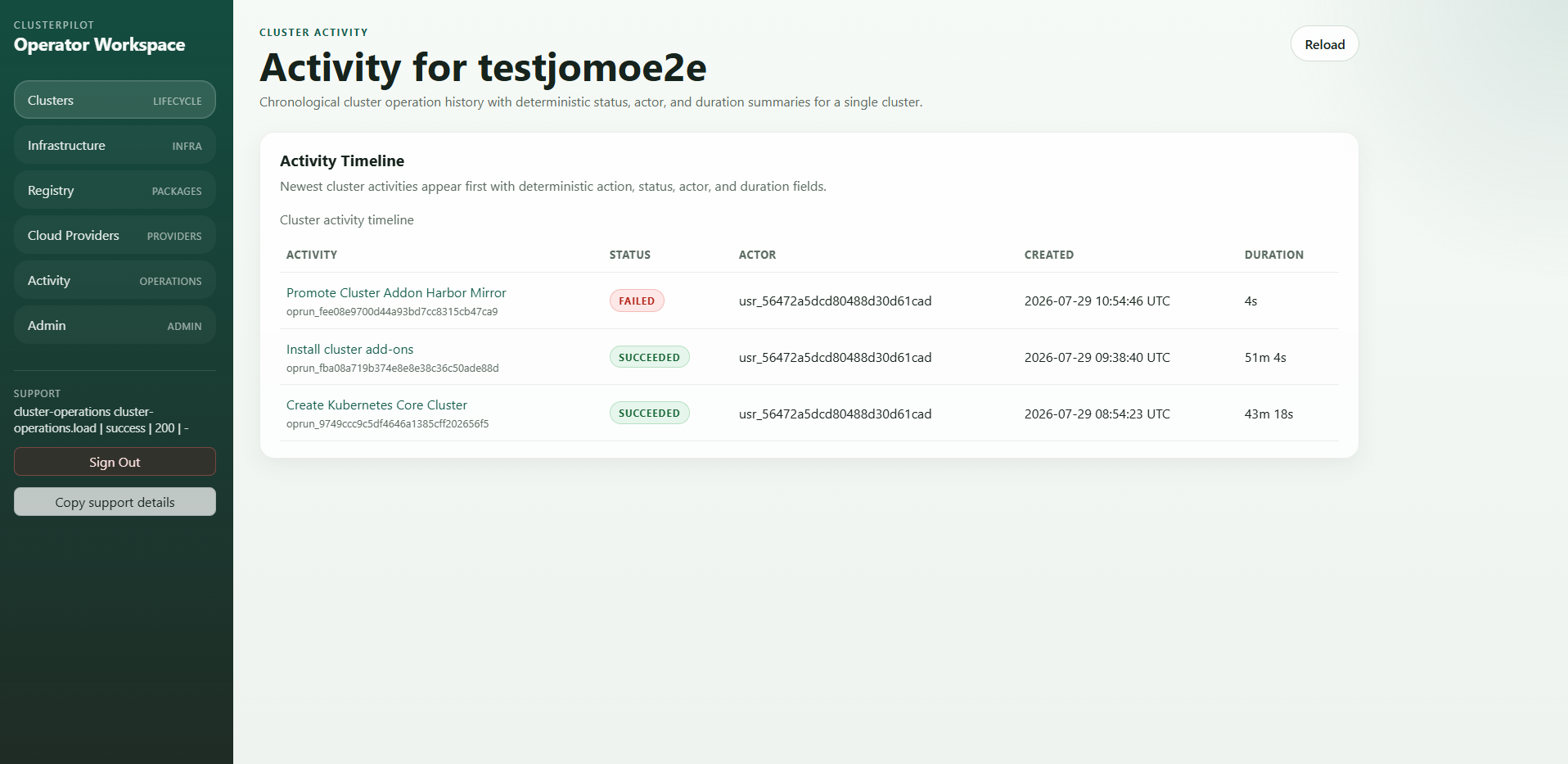
The team's benefit comes from specific activities: executing recurring steps, understanding the current status and investigating failures with relevant context. The product view below shows the activity timeline. It illustrates the interface; it does not substantiate the times used in our example calculation.
Bring one recurring task and your current effort to a demo. Together, we can check which steps ClusterPilot handles and which measurements would make the comparison useful.
Your checklist for the next team meeting
Copy these points into a ticket or team document. They give you a simple basis for selecting one workflow and preparing a useful comparison.
- Describe the task: what repeats, how often and who is involved?
- Measure the baseline: active person-time, waiting and rework separately.
- Define success: which acceptance checks must the result pass?
- Include costs: setup, tools, infrastructure, training and maintenance.
- Plan the comparison: review several similar runs before and after automation.
- Make the decision: assess quality, effort and the actual benefit together.
Frequently asked questions about Kubernetes operating costs
What belongs in Kubernetes operating costs?+
Include servers, storage and networking, time spent on operations and support, and tools with their setup and maintenance. Use the same time period when comparing these areas.
How much can a team save through automation?+
It depends on frequency, current manual effort, the amount that can be automated and additional costs. Measure your own workflow. The 20 hours in this article come from an illustrative calculation.
Does less manual work automatically reduce the cloud bill?+
Less manual work initially frees team capacity. The infrastructure bill falls when fewer billable resources are used or their price changes. Assess those effects separately.
Do we need a new platform immediately?+
Start by measuring effort. A clear standard process or better use of existing automation may already help. A central platform becomes particularly useful when recurring tasks span many people and environments.